From quote to payment. One system.
Binaqo brings customers, quotes, projects, planning, invoices and payments together — so you run your business and keep an eye on margin from one place.
Rolled out in phases — start today or book a demo.
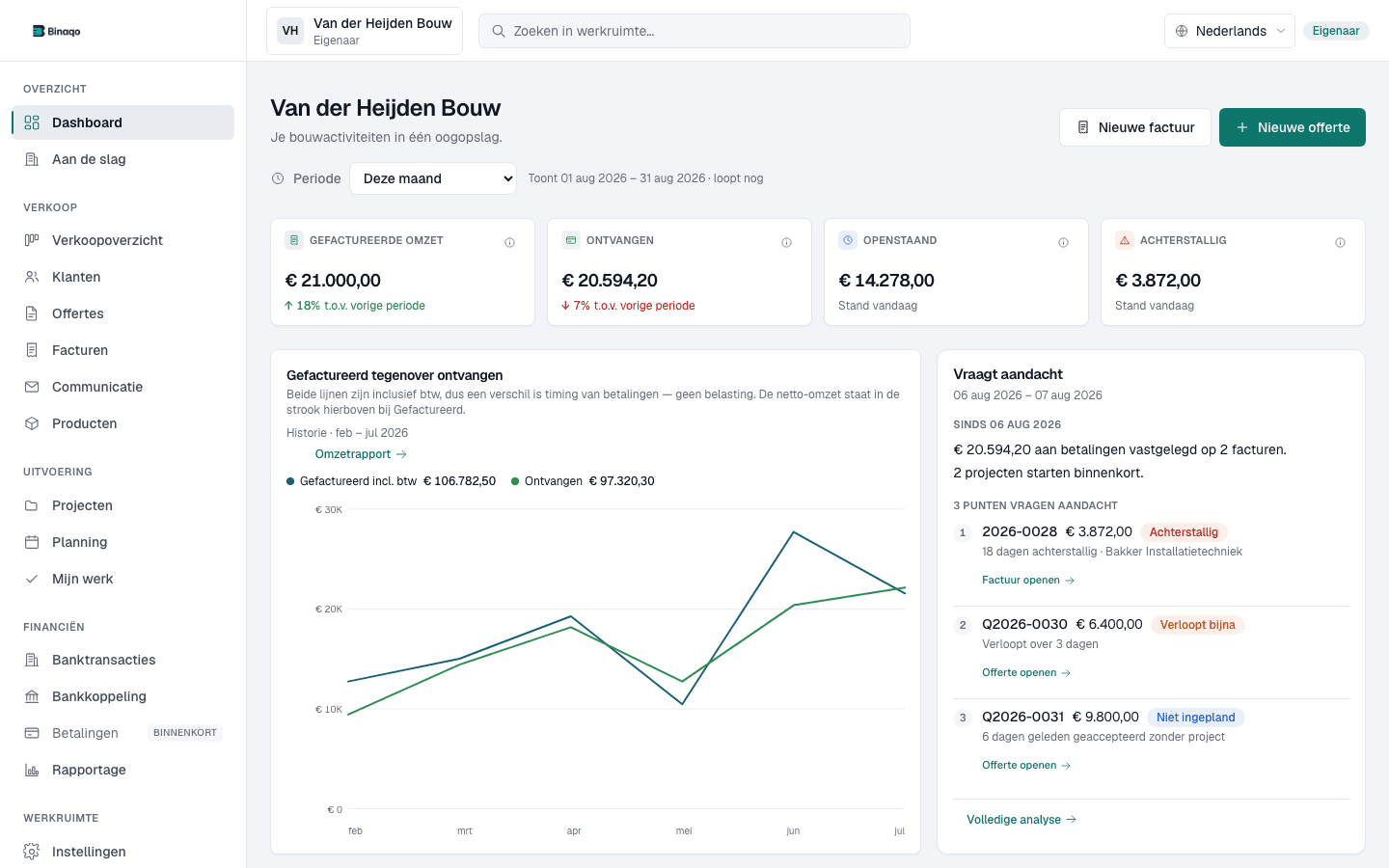
Project file
Professional quotes
Send, track and get them approved
Invoices & payments
See what is outstanding and overdue
Projects in control
Work and money in one file
Business insights
Revenue, receivables and pipeline
This is Binaqo. Not an impression.
Real screens from a demo workspace with fictional customers and projects. No mockups, no recreated interface.
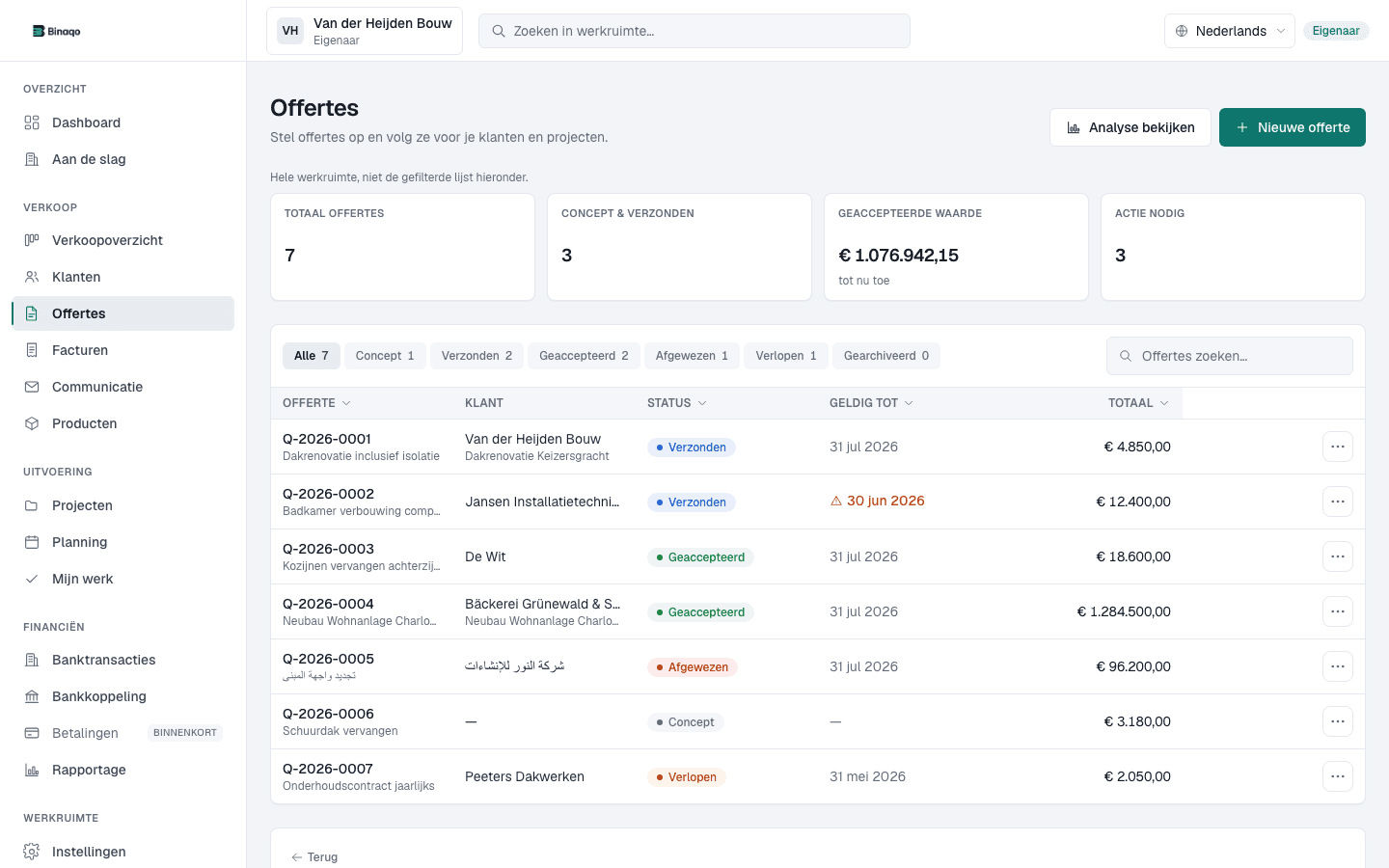
Professional quotes
Quotes tracked from draft to approval
See which quotes are open, sent or accepted — then follow up without a separate spreadsheet.
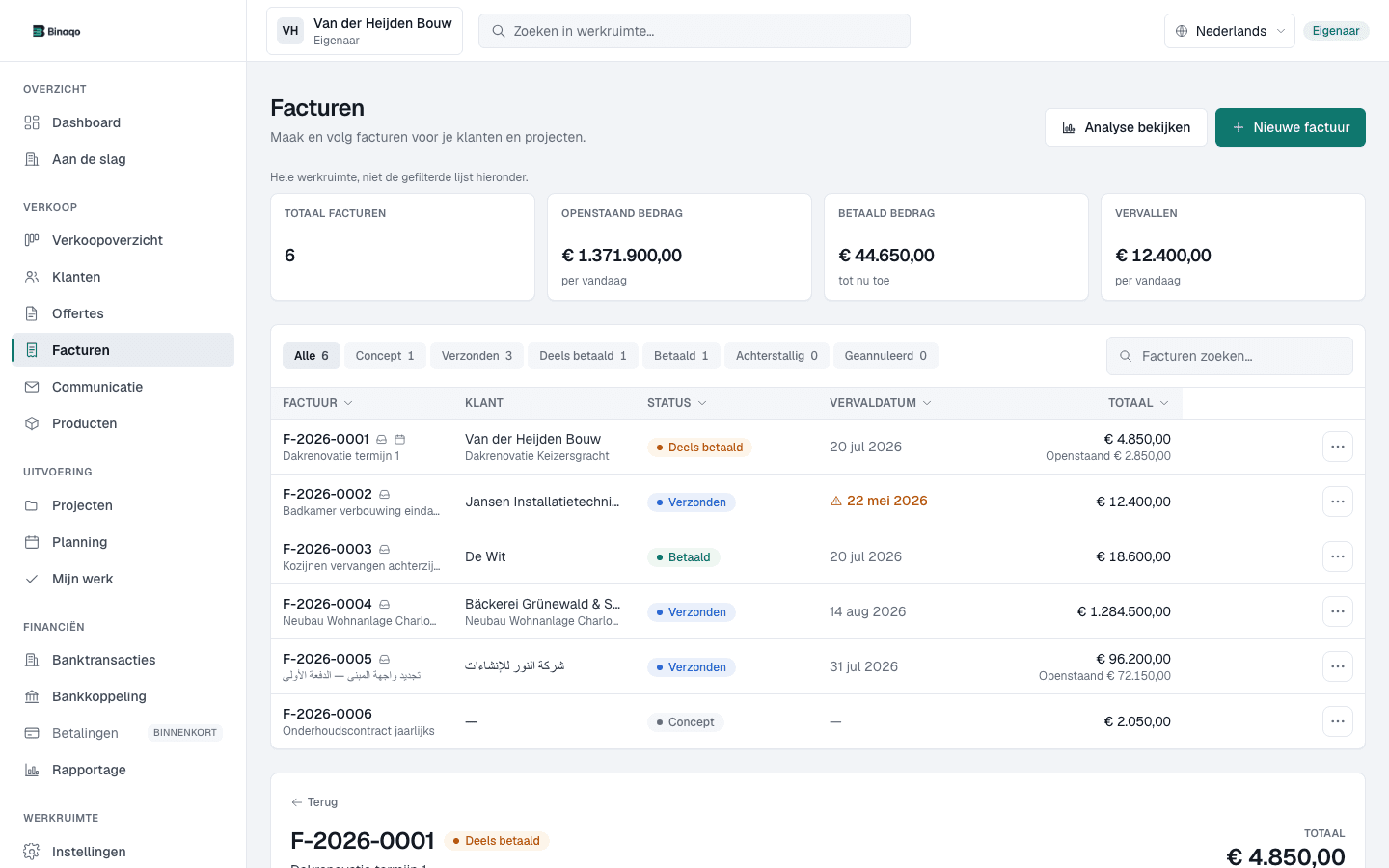
Invoices & payments
Invoices with payment status in view
See drafts, sent, paid and overdue in one list — then open the invoice that needs attention.
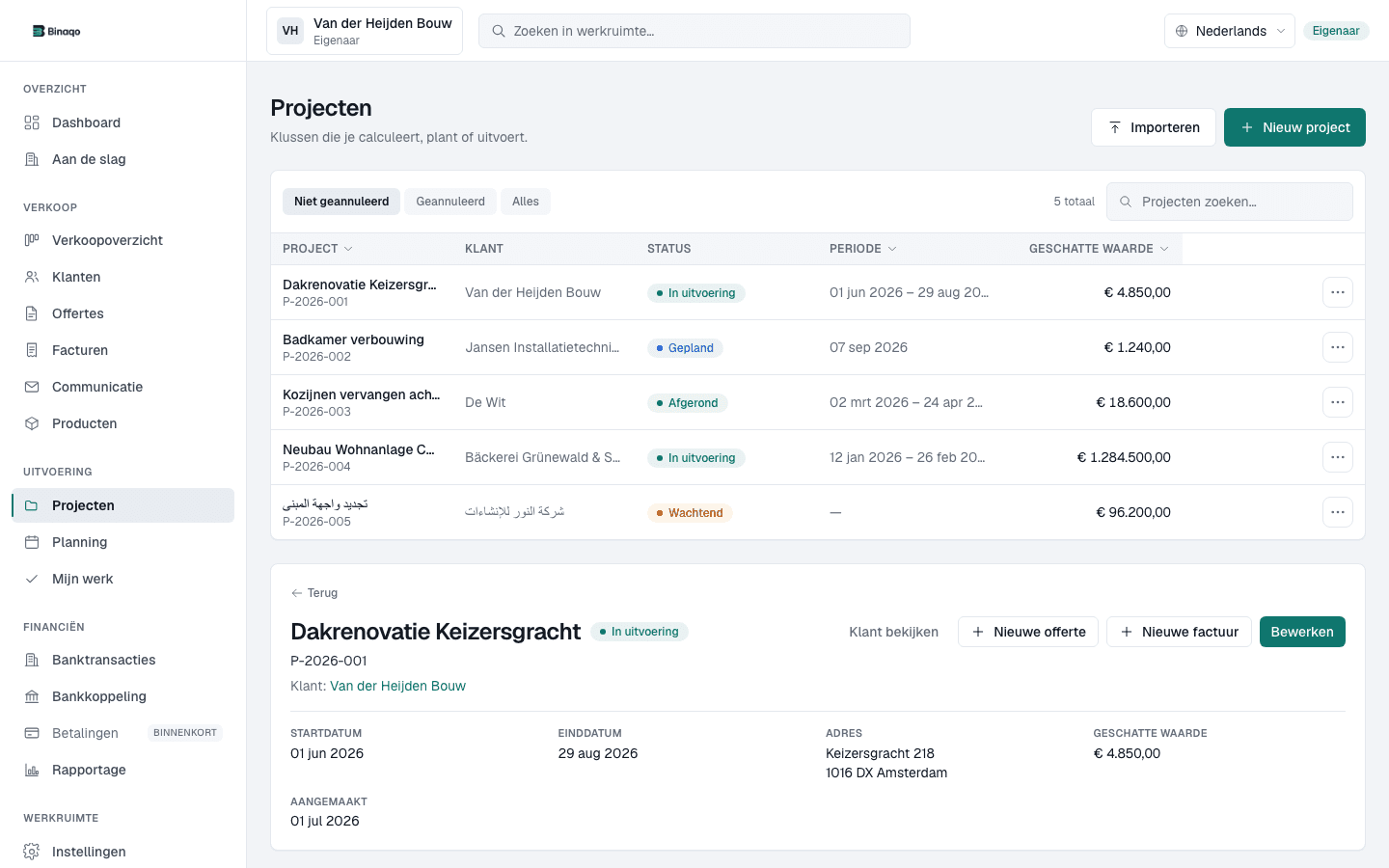
Projects in control
Projects with work and money together
Every job sits in one list with its customer and status, so you can see what is in progress.
Your business is growing. Keep a grip on what grows with it.
Without one system, the overview scatters across loose tools — costing you time, margin and cash flow.
- More customers
- More quotes
- More work
- More invoices
One connected workflow in Binaqo
One place for your customers, your work and your money — no retyping, no loose files.
Scattered Excel files
Numbers live in spreadsheets that never quite match the latest state of the work.
Agreements in WhatsApp
Decisions about change orders and planning disappear into chat threads.
Quotes and invoices detached from projects
Documents live in folders and inboxes with no link to the project.
Forgotten change orders
Extra work gets done but never invoiced — revenue is left behind.
Late insight into margin and cash flow
You only see where a project stands when it's too late to steer.
One project file
Everything about a job — documents, agreements and status — in one place.
Quotes, change orders and invoices connected
From approval to final invoice, everything follows the same file.
Payments and outstanding amounts visible
See per project what has been paid and what's still outstanding.
Reporting per project
Margin and cash flow per project, without spreadsheet work.
From request to payment — with no loose links.
Binaqo is project-first: every quote, change order and invoice stays connected to the project file.
Every step is something you do yourself. Binaqo never sets anything in motion behind your back.
Quote
Project file
A professional quote with line items, VAT and deposit.
- Draft
- Sent
- Approved
Built for the day-to-day of your business.
Not loose tools, but one system that speaks your language: deposit, instalment invoice, change orders and project margin.
Project files
One file per job with documents, agreements, status and financials — from first contact to handover.
Cash flow & margin
See expected margin and cash flow per project — including outstanding amounts and change orders still to invoice.
In your reporting
Pro- Invoiced
- Received
- Outstanding
- Overdue
Quotes
Quotes with line items, VAT and deposit. Your customer signs online and the approval lands straight in the file.
- Draft
- Sent
- Approved
Change orders
Record extra work before you do it. Approved change orders are ready to invoice — nothing slips through.
- Recorded
- Approved
- Ready to invoice
Invoices & payments
Deposit, instalment invoice and final payment from the project. Outstanding amounts are always visible.
- Deposit
- Instalment
- Final invoice
Planning
Put appointments and crews on the planning board and send work orders to site.
Client portal
Customers see their project, quotes and invoices in their own secure environment.
Your own branding
Reusable templates for quotes and invoices, with your own colours and texts per language.
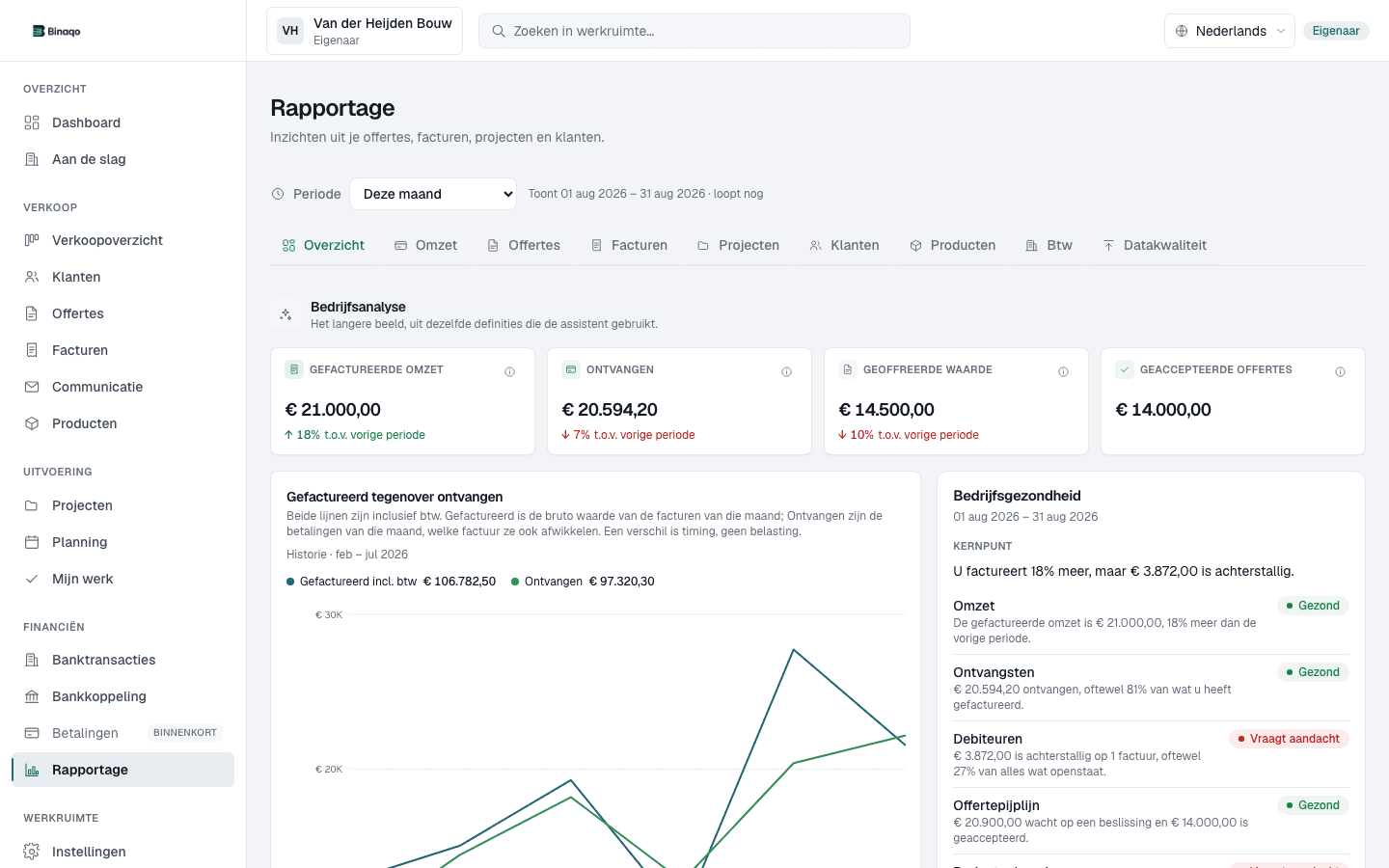
Cash flow & margin
See expected margin and cash flow per project — including outstanding amounts and change orders still to invoice.
In your reporting
- Invoiced
- Received
- Outstanding
- Overdue
See expected margin and cash flow per project — including outstanding amounts and change orders still to invoice.
Project files
One file per job with documents, agreements, status and financials — from first contact to handover.
Bathroom specialists
From showroom quote to handover: deposit, delivery and final payment under control.
- Quote
- Project file
- Change orders
- Invoice
- Payment
Project file
Bathroom specialists
- Quote and approval recorded
- Planning and agreements in the file
- Instalments and payments linked
Built for companies running multiple projects at once.
Binaqo matches how construction, technical and service companies actually work — not how office software thinks you work.
For freelancers & SMBs
Built to grow with your business
Construction, technical & services
For companies that plan work and invoice
Multilingual support
Help in the languages Binaqo supports
Renovation companies
Several renovations at once, each with its own file, instalments and change orders.
Bathroom specialists
From showroom quote to handover: deposit, delivery and final payment under control.
Finishing companies
Tight files per project, including subcontracted work.
Contractors
A grip on quotes, work in progress, outstanding amounts and project margin.
Installation & maintenance teams
Small and large jobs side by side, with clear invoicing and follow-up.
Built to take your administration seriously
No certifications we do not hold. Just a clear account of how your data, your team and your invoicing are separated.
Your own workspace
Every company works in its own workspace. The database separates data per workspace, not just the interface.
Roles and permissions
Owner, admin, staff and viewer. You decide who can see and change what.
Your data stays yours
Bring customers, products and projects across by CSV import, and take your administration back out as CSV.
Account first, payment after
You create an account and workspace first. Payment happens after that, signed in and secured.
Binaqo is not accounting software and does not make payments on your behalf. Bank statements are only read if you set up a connection yourself.
Start with the plan that fits your business.
Choose Start, Pro or Premium. Binaqo is rolled out in phases — begin with your own workspace or book a demo.
3 users · 10 active projects
For small contractors and solo operators starting with quotes, invoices and project basics.
- Customer records with contact details and history
- A project file for every job
- Quotes with VAT and online approval
- Invoices with PDF and email
10 users · 35 active projects
For renovation companies managing multiple projects, instalments, change orders and team workflows.
- Record and invoice change orders
- Flexible instalment schedules per invoice
- Payments and outstanding amounts
- Reporting on revenue, margin and cashflow
All prices exclude VAT. Switch or cancel monthly. Prefer a guided start? A limited founding programme with hands-on onboarding is still available on request.
Frequently asked questions
What is Binaqo?
Binaqo is business software for quotes, projects, planning, invoices and payments. It brings customers and administration together in one platform, with strong workflows for sectors such as construction, technical services and professional services.
Who is Binaqo for?
For freelancers, small and medium businesses and growing teams that work with quotes, work or projects, planning and invoices — including construction, technical services, installation, renovation and professional services.
Is Binaqo suitable for contractors?
Yes. Binaqo is built for contractors who run several projects at once and want a grip on quotes, invoices, margin and cash flow.
Is Binaqo suitable for renovation companies?
Yes. Renovation companies use Binaqo to manage multiple renovations at once, each with its own project file, instalments and change orders.
Is Binaqo suitable for bathroom specialists?
Yes. From showroom quote to handover, bathroom specialists keep deposit, delivery and final payment under control in Binaqo.
Can I create quotes with Binaqo?
Yes. You create professional quotes with line items, VAT and a deposit, and your customer approves them online — the approval lands straight in the project file.
Can I create invoices with Binaqo?
Yes. You invoice in stages — deposit, instalments and final invoice — and always see what is still outstanding per project.
Can I record change orders in Binaqo?
Yes. You record extra work before it happens; approved change orders are ready to invoice, so no revenue slips through.
Can I bring my existing customers and projects across?
Yes. You import customers, products and projects from CSV files. Binaqo shows per import what was added, updated or skipped, so you can check the result before you carry on.
Can my customer access their own project?
Yes, with the client portal on Premium. You invite a customer by email; they get their own login and only see their own projects, quotes, invoices and the appointments you make visible, including the PDFs. Customers cannot change anything and never see internal notes.
Can I create quotes and invoices in several languages?
Yes. You pick the language per document: Dutch, English, German, French, Spanish or Arabic. The PDF and the accompanying email follow that language, independently of the language you use Binaqo in.
Can I use my own branding?
Yes, with document templates on Premium. You set the layout, accent colour, logo position and standard texts per language, with a live preview alongside. A sent document keeps the template version it was created with.
Does Binaqo support planning?
Yes, from Pro. You plan appointments and crews on a planning board, assign people and work on site with work orders. Appointments you make visible to the customer appear in the client portal.
Is my data separated from other companies?
Yes. Every company works in its own workspace and the database separates data per workspace. Inside your own workspace, roles decide who can see and change what.
Can Binaqo replace Excel and Word?
Yes. Binaqo replaces loose Excel sheets and Word quotes with one connected system, so your numbers and documents always match the actual project.
Can I invite my team?
Yes. You invite team members with their own roles and permissions — from full access to view-only.
Can I get support inside Binaqo?
Yes. Help and support are available from inside Binaqo, and Premium includes priority support.
Does Binaqo work with accounting software?
Binaqo is not accounting software, but you can export your data as CSV for your accountant. UBL export and accounting integrations are on the roadmap.
What can the Binaqo assistant do?
The assistant can read along in your workspace and prepare drafts, for example a draft quote or a draft appointment. It sends nothing and records nothing without you confirming it. The assistant is being released step by step and is not yet available in every workspace.
Are bank transactions, UBL and planning coming?
Yes, they're on the roadmap. Bank transactions, UBL/export for your accountant and planning/calendar aren't part of the current plans yet — we deliberately don't promise anything that isn't there.
How do I get started?
You create an account, set up your workspace and choose Start, Pro or Premium. Secure checkout happens after signup, inside your workspace. Prefer a guided start? Book a demo and we'll walk you through it.